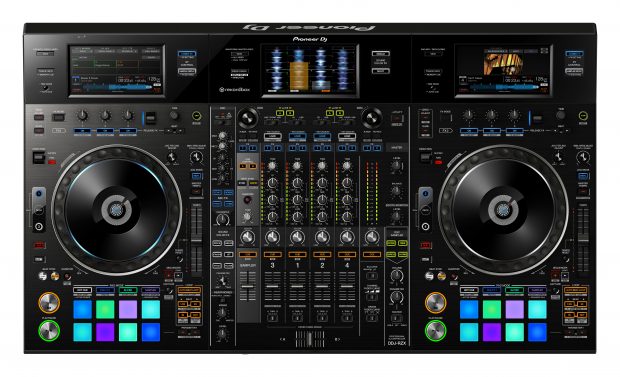
Pioneer DJ is introducing the new DDJ-RZX flagship controller. Designed to make the most of the new rekordbox™ video Plus Pack for rekordbox dj, the DDJ-RZX builds on Pioneer DJ’s heritage of making innovative video DJ equipment like the DVJ-1000 and SVM-1000. The DDJ-RZX is a 4-channel professional controller for mobile DJs and anyone who wants to bring videos into their performances.
The DDJ-RZX features three touch screens for viewing track information and applied pad effects. Video previewing and monitoring is sharp on the 7-inch screens, and they give access to all the key features in both rekordbox dj and the new rekordbox video Plus Pack. You only need to use your laptop to browse your rekordbox library and select tracks. Two XLR combo input jacks give distortion-free Mic output and the 3-band Mic EQ and Mic FX let you tune each voice. Plus, the extensive FX unit includes Combo FX, Sampler Repeat and Release FX, as well as the studio-quality Sound Color FX from the DJM-900NXS2 mixer. The DDJ-RZX inherits traits from the CDJ-2000NXS2 multiplayer and DJM mixer series including large jog wheels, multi-colored Performance Pads and high-quality sound.
The DDJ-RZX will be available in the U.S. and Canada from July 2016, with a retail price of $2999.00. The DDJ-RZX will come bundled with license keys for rekordbox dj, rekordbox dvs, and rekordbox video Plus Packs (a $377.00 total value).
rekordbox video is a Plus Pack for rekordbox dj that adds video performance features to our rekordbox dj performance software. Its key features include:
- Native control of videos – scratch and add FX to videos as if they were audio tracks
- Transition FX – use the crossfader to mix two video sources with a choice of 20 built-in FX, or add up to five effects to your favorites and recall them
- Touch FX – trace on the display’s x and y axes to add FX and adjust parameters
- Slideshow – create slideshows of still images in advance or on the fly
- Camera output – show the live feed from a digital camera connected to your computer
To buy the rekordbox video Plus Pack for rekordbox dj, follow these steps:
- Download and install rekordbox music management application version 4.2 for free (available from July 1, 2016).
- Purchase a rekordbox dj Plus Pack license key for $129.00 (if you don’t own one already) and activate the Plus Pack.
- Purchase a rekordbox video Plus Pack license key for $149.00.
If you’re a rekordbox dj monthly subscriber, you can use the video features without buying a license key (included as part of the subscription). Find out more about the rekordbox family.
Watch the DDJ-RZX introduction video.
Learn more about the DDJ-RZX rekordbox dj controller.
KEY FEATURES OF THE DDJ-RZX
- Layout mirrors a CDJ set-up
Mix audio and videos instinctively with features inherited from the CDJ and DJM series including large jog wheels and multi-colored tactile Performance Pads. The 4-channel controller has an independent sampler section for intuitive control of Beat Sync, Quantize and Trim on the sampler.
- High-quality sound
Hear the true sound of your tracks thanks to AC inlets for reduced cable contact resistance and a high performance 96 kHz/32-bit D/A converter made by Asahi Kasai. Plus, low jitter clock IC and the 96 kHz/24-bit USB sound card ensure powerful, high-quality sound.
- Three touch screens for complete control
Take your performances to the next level by using the three 7-inch touch screens to preview/monitor video and image files, and to trigger Beat FX and Release FX. Plus, Touch FX lets you add FX and adjust parameters by tracing on the x and y axes on the display. Use deck display mode to check track information such as titles, BPM and key. Additionally, use mixer display mode to see enlarged waveforms for each track, as well as loop and Hot Cue information. Create instant doubles by simply touching the display.
- Professional Mic section
Hear voices loud and clear thanks to two XLR combo input jacks for Mics. Control the output with the 3-band Mic EQ and use the four Mic FX – Echo, Reverb, Pitch and V Tune – to add texture and to tune each voice.
- Extensive FX unit
Add the following FX to your tracks from rekordbox dj or external players and sound sources:
- Combo FX – control Sound Color FX and Beat FX at the same time using the touch screens
- Sampler Repeat – change the length of a loop just by touching the display and apply Sound Color FX when using the rekordbox dj sampler
- Sound Color FX with sub parameter control – use the studio-quality Sound Color FX from the DJM-900NXS2 mixer including Sweep, Filter, Crush, Dub Echo, Noise and Space, and fine-tune them using sub parameter control
- Release FX – exit complex FX patterns by selecting Vinyl Brake, Echo or Back Spin and twisting the dial
- Other features
- Active Censor – intuitively control the new Active Censor feature in rekordbox dj. Set in and out points and apply Reverse Roll, Trans, Echo or Vinyl Brake FX to disguise explicit words in tracks. The FX will then be heard whenever the track is played from rekordbox dj.
- Three bundled license keys – comes with license keys for rekordbox dj, rekordbox dvs and rekordbox video
- Newly developed crossfader – highly durable and capable of over 10 million movements
- OSC sampler – four oscillator sounds
- Dual USB port – for smooth transitions between DJs
- Brushed aluminum faceplate – high quality and professional design
- P-Lock fader cap – locks fader knobs to prevent dropping
A protective case for the DDJ-RZX will be available. Made from lightweight, durable materials, it has a robust, black metal frame to keep your controller safe during transit. It also features built-in carry handles and wheels for easy transportation (to be sold separately).